You’re already on a low pack and you have a choice to make. Pull into a Shell Recharge site, or hold out for a Supercharger. The honest answer is that neither one is universal. Both have a role, and the right pick depends on what you’re driving, which way you’re headed, and how low you actually are.
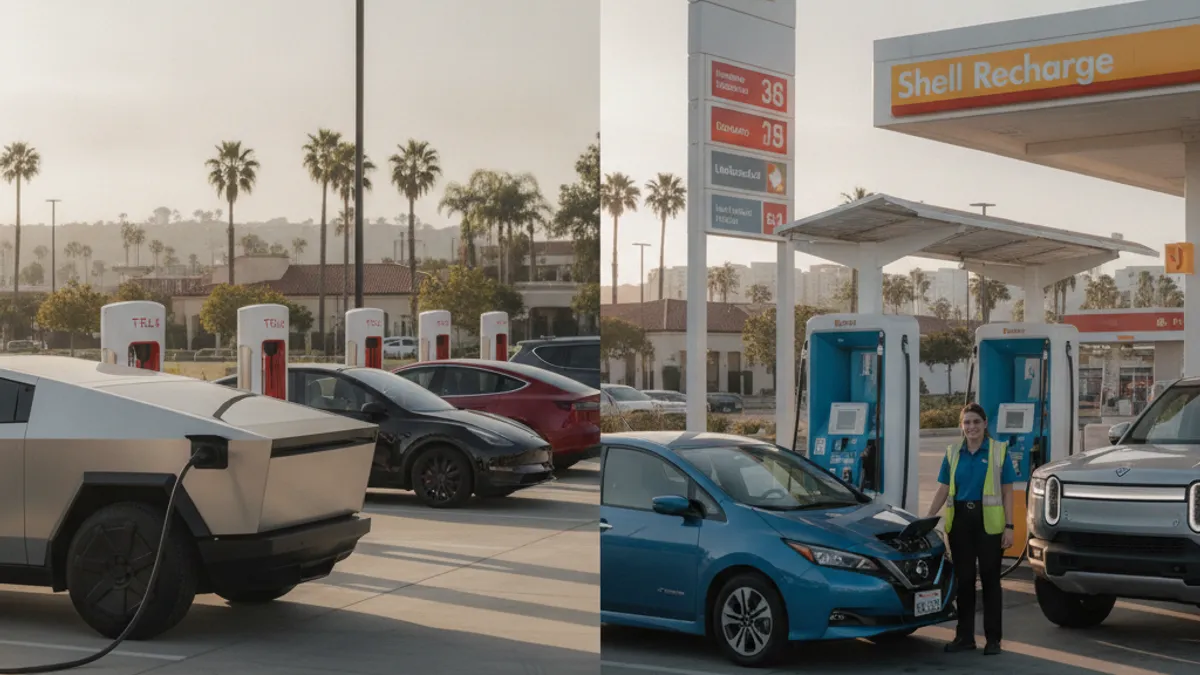
The Bay Area mixes both networks along the same drives
US-101 runs from San Jose up through San Mateo and into San Francisco. I-880 runs from San Jose north through Fremont, Hayward, Oakland, and Emeryville. Both corridors carry a mix of Tesla Supercharger sites and CCS fast-charging sites from Shell Recharge and other third parties. On a typical Bay Area commute, you’ll see both.
This page won’t quote stall counts. Inventory changes month to month, and we couldn’t pull a verified Bay Area network count for this pass. What matters is the operational difference. Knowing which network fits your car and your driving line keeps you from pulling into a dead stall on a thin pack.
Superchargers: dense, consistent, native for Tesla
Tesla built the Supercharger network for its own vehicles. Stations along the Bay Area’s main corridors see steady uptime because Tesla controls the hardware, the software, and the vehicles end to end. Tesla cars use NACS natively. They plug in and start a session without an adapter.
More recent Supercharger sites support non-Tesla EVs through what Tesla calls Magic Dock. The Magic Dock is a CCS adapter built into the cable. Not every Supercharger has one. Check the Tesla app for station-level compatibility before you route there. Coverage varies stall by stall. If you drive a Rivian, Ford, Hyundai, or another non-Tesla EV, Magic Dock is the bridge into the Supercharger network at compatible sites.
For a deeper look at what to do when a Supercharger itself is down, read Tesla Supercharger down guide.
Shell Recharge: CCS, gas-station convenience, more variability
Shell Recharge runs CCS fast chargers. Many sites are installed at Shell gas stations, which means familiar locations, restrooms, and the option to step inside while you wait. The native plug is CCS, which is the standard for most non-Tesla EVs. Tesla drivers need a CCS adapter to use Shell Recharge sites.
The trade-off is consistency. Third-party networks including Shell Recharge have historically shown more variability in uptime and charging speed than the Supercharger network. The hardware, the software, and the vehicles come from different companies that all have to work together. Most of the time it works fine. Some of the time a stall sits in an error state. Having a backup plan before you pull in keeps you from being the car that ran a low pack to a dead stall.
For a deeper look at troubleshooting a public charger that’s not behaving, see public EV charger down in the Bay Area.
Other networks you’ll find along the same routes
Shell Recharge isn’t the only third-party option. Electrify America and EVgo both run CCS fast chargers around the Bay Area too. You’ll see them at shopping centers, along I-880, and at mixed-use sites off US-101. ChargePoint is more common for slower Level 2 public charging at offices, hotels, and parking structures than for DC fast charging.
Pricing structures also vary by network and sometimes by session. Some charge per kWh. Some charge per minute. A few add idle fees if you leave your car plugged in after the session completes. None of those differences are dealbreakers, but they add friction that the Supercharger network largely avoids for Tesla drivers.
Picking the right one on a low pack
The decision order looks like this.
- If you drive a Tesla and there’s a Supercharger within range, use the Supercharger. The native plug, the consistent speed, and the predictable uptime are hard to beat. Shell Recharge stays a backup for when the Supercharger is full or out of service.
- If you drive a non-Tesla EV with native CCS, Shell Recharge and other CCS networks are your primary option. Magic Dock Superchargers are an increasingly common secondary choice where available. Confirm Magic Dock before you route, not when you arrive.
- If the closest site is a Shell Recharge stall and you’re already low, treat it as one stop among several. Don’t drive past a working site to chase a different network. Charge enough to reach your next stop, not to fill the pack.
The single most useful habit for any Bay Area EV driver is to plan with more than one network in mind. Check your car’s native navigation or a charging app before a longer trip. Note a fallback site. It costs nothing and it’s the difference between a short detour and an actual roadside call.
What to do if neither site works out
Public charging doesn’t always cooperate. A Supercharger fills up. A Shell Recharge stall sits in an error state. A station that was on the map last week is gone. If that leaves you critically low on range anywhere in the Bay Area, an operator in our network can bring a mobile Level 2 source to you. Tesla cars plug in natively. Non-Tesla EVs use a CCS or J1772 adapter. A typical session adds 10 to 20 miles of range. That’s 15 to 30 minutes of charging time. That’s charging time, not an arrival window.
Our out of charge recovery page walks through that service. For a broader view of what a mobile rescue rig actually does, see how a mobile EV charging truck works.
Freeway beats versus surface streets
If you’re on US-101, I-880, I-580, I-680, I-80, SR-237, or any full-access freeway, the Freeway Service Patrol is a public option during weekday hours. FSP runs Monday to Friday, 6 to 10 AM and 3 to 7 PM. Dial 511 and say Freeway Assist. The published FSP menu is gas, jump-starts, and radiator refills. It doesn’t list EV charging or out-of-charge help. If your EV is what you drive, an FSP truck won’t bring you a CCS cable.
Outside FSP hours, calls go to the CHP Rotation Tow Program. The driver doesn’t pick the company. That program is for towing, not for energy. For an EV that ran out of charge on a freeway shoulder, the answer is mobile Level 2 charging or a flatbed, not the rotation tow.
What we couldn’t confirm for this page
Stall counts change. Bay Area Supercharger and Shell Recharge site counts weren’t verified in this research pass. The networks’ apps are the live source. Use them in your car before you commit to a stop. Don’t trust a map pin without checking current status on your phone.
What to say when you call for backup
Tell the operator the network you tried. Tell them the stall identifier or the site address. Tell them what your car shows for state of charge and what the dashboard says. If you’re on a freeway shoulder, give the route, direction, nearest exit, and visible landmark. If you’re in a parking structure, name the level and the entrance.
Charge Pro SF is a referral line. We don’t own trucks. The pros we connect you with are licensed and insured. They quote you before any cable goes on. We serve the Bay Area, including San Francisco, the Peninsula, the South Bay, the East Bay core, the Tri-Valley, Central and East Contra Costa, and the Coastside.
Call (415) 630-6268 when you want a match to a local operator. The operator who takes the job gives you the quote.